Lecture 4 Avoiding the Problems (SDLC)
In This Lecture You Will Learn:
- Project Failure Issues
- The Main Players
- The Stages in the Waterfall Life Cycle
- Managing Information System Development
- User Involvement
Project Failures Issues
The failures in information systems development teaches valuable lessons which decreases the repeating of past mistakes.
Understanding the failures of information system development project helps to avoid it.
The Main Players
Three main types of player are involved in an IS development project:
- Those who will benefit from the system’s outputs, directly or indirectly (end-users)
- Those who commission the project, pay for it or have the power to halt it (owners or sponsors)
- Those who will produce the software (developers)
End-User View
End-users may directly operate the software, or may be more remote, e.g. a manager who receives printed reports
Typical concerns include:
- A system that is promised but not delivered
- A system that is difficult to use
- A system that doesn’t meet its users’ needs
Owner View
Owners care about meeting business needs and about value for money
Typical concerns include:
- Projects that overspend their budget (may no longer have a net benefit)
- Systems that are delivered too late
- Badly managed projects
- Systems that are rendered irrelevant by events
Developer View
IS developers sometimes have a difficult time
- Budget and time constraints often conflict with doing the job properly
- Users and owners may not know how to ask for what they really want
- Technologies, development approaches and business needs all constantly change
Why Things Go Wrong
Whether a system is delivered or not, many things can go wrong
Flynn (1998) categorizes the main causes as:
- Quality problems
- Productivity problems
Quality Problems
- The wrong problem is addressed
- Failure to align the project with business strategy
- Wider influences are neglected
- Project team or business managers don’t take account of the system environment
- Incorrect analysis of requirements
- Poor skills or not enough time allowed
- Project undertaken for wrong reason
- Technology pull or political push
Productivity Problems
- Users change their minds
- External events
- E.g. introduction of the Euro
- Implementation not feasible
- May not be known at start of the project
- Poor project control
- Inexperienced management or political difficulties
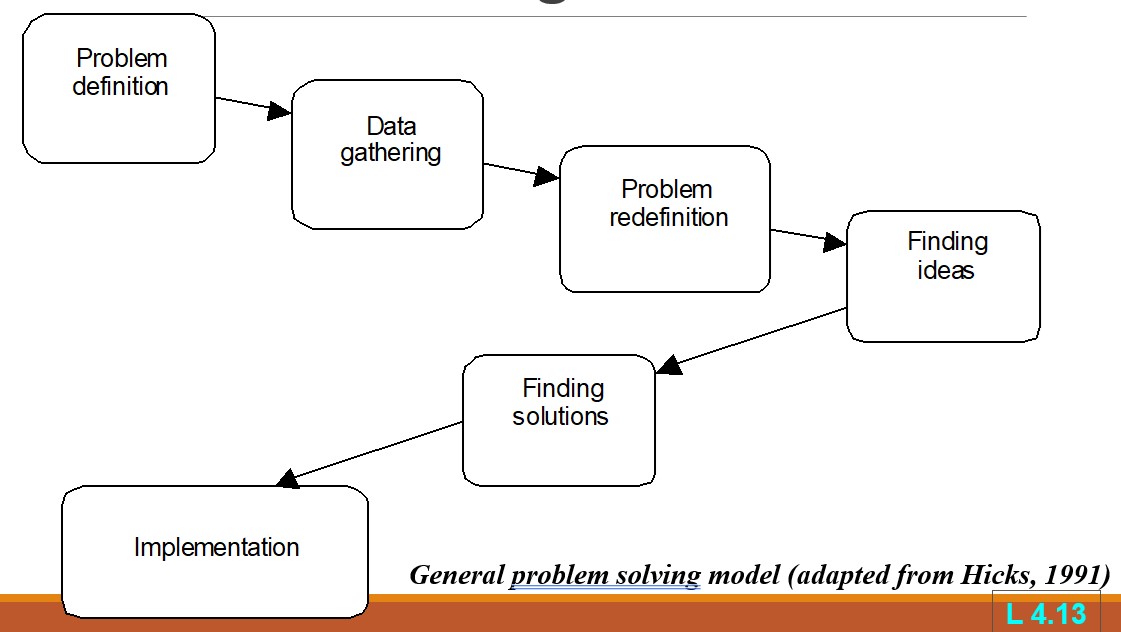
Problem Solving Model
Main phases are
- Data gathering
- Problem redefinition
- Finding ideas
- Finding solutions
- Implementation
Data gathering & Problem redefinition focus on understanding what the problem is about
Finding ideas & Finding solutions concerned with understanding more about the nature of the problem and possible solutions
Project Life Cycles
- A distinction should be made between
- Systems development which incorporates human, software and hardware elements
- Software development which is primarily concerned with software systems
- Two important phases are
- Strategic Information Systems Planning
- Business Modelling
Waterfall Life Cycle
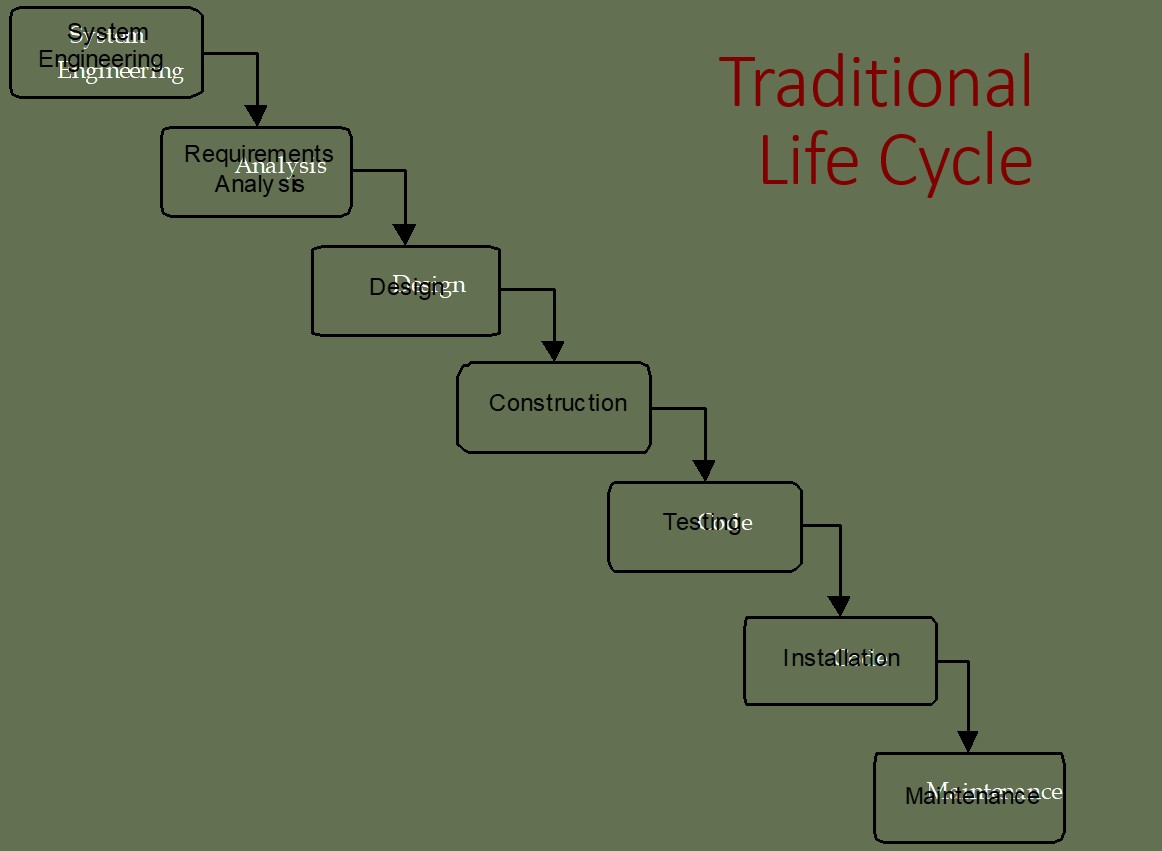
- The traditional life cycle (TLC) for information systems development is also known as the waterfall life cycle model
- So called because of the difficulty of returning to an earlier phase
- The model shown here is one of several more or less equivalent alternatives
- Typical deliverables are shown for each phase
TLC Deliverables
- System Engineering
- High Level Architectural Specification
- Requirements Analysis
- Requirements Specification
- Functional Specification
- Acceptance Test Specifications
- Design
- Software architecture specification
- System test specification
- Design specification
- Sub-system test specification
- Unit test specification
- Construction
- Program code
- Testing
- Unit test report
- Sub-system test report
- System test report
- Acceptance test report
- Completed system
- Installation
- Installed System
- Maintenance
- Change requests
- Change request report
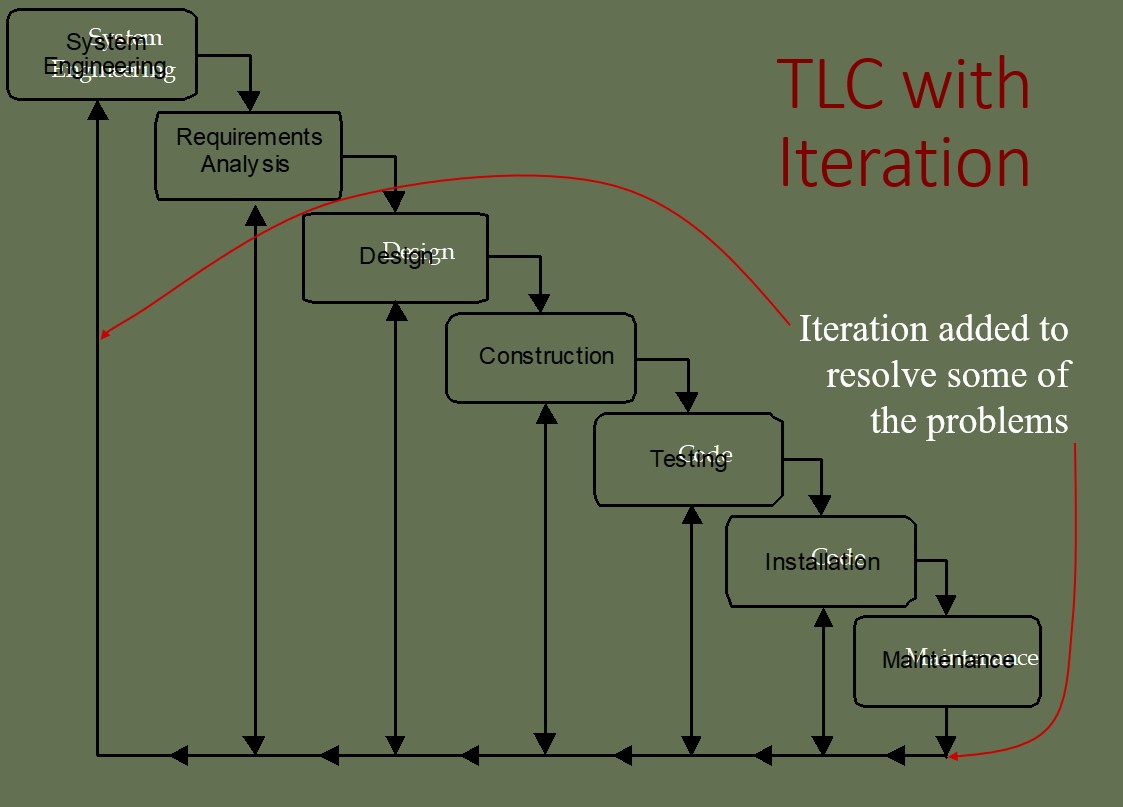
Problems with TLC
- Real projects rarely follow such a simple sequential life cycle
- Iterations are almost inevitable
- Time elapses between system engineering and the final installation
- The design is unresponsive to business changes during the project
Strengths of TLC
- Tasks in phases may be assigned to specialised teams
- Project progress evaluated at the end of each phase
- Manage projects with high levels of risks
Phases of System Development Life Cycle (SDLC)
- System Planning
- What’s the system for?
- What are the subsystems involved in this system?
- Is there anything wrong with the current system?
- Is there anything that has to be improved on?
- Deliverables:
- Preliminary Investigation Report
- Note:
- Knowing the scope of the system is important!
- Focus!
- Don’t do something out of your system’s scope
- Initial understanding of problems is essential
System Analysis
- Find out more about the purpose of this system
- How’s this system interacting with the other systems?
- What are the subsystems of this system?
- What are the purposes of these subsystems?
- Dig for more info about problems identified
- Find out also how to improve current system
- Are there any constraints?
- Ask users what exactly are their roles in this system?
- Ask users also what are their expectations of the system
- Deliverables:
- Data Flow Diagrams / Data Dictionary / UML Diagrams / ER Diagrams etc.
- System Requirements Report (Functional Vs. Non-functional requirements)
- Note:
- Clear understanding of the exact scenario is of utmost importance!
- Tackling incorrect problems would result in wasting of good resources
- Important to ensure that everybody has the same understanding of the scenario
- Communication plays a major role here
System Design
- Understand processes involved in each individual subsystems
- Understand the interconnectivity among the subsystems
- Know how to connect all subsystems together to form the system
- Design the interface for the subsystems (input and output)
- Deliverables:
- Design Specifications report
- Update the Data Flow Diagrams / Data Dictionary / UML Diagrams / ER Diagrams
- Note:
- Get in touch with intended users frequently to ensure proposed design meet their expectations
System Implementation
- Determine hardware & software requirement
- Determine the best & most appropriate programming language to use
- Plan on the best methods to train intended users
- Plan appropriate conversion strategy to migrate from existing to new system
- Deliverables:
- Documentation of all the items mentioned above
- Note:
- Ensure that users had been kept updated on the progress
- Get the users to provide feedback from time to time
- Types of Conversion Strategy: Parallel; Direct; Phased; Pilot
- Types of testing: Unit testing; Integration Testing; Validation/Acceptance Testing; System Testing
System Testing and Maintenance
- Check whether all subsystems are working “harmoniously” with one another
- Check whether the system is functioning as intended (using both test & actual data)
- Check the stability of the system
- Are the users happy with the system?
- Are there any aspects of the system which could be improved further?
- How can the system be maintained to lengthen its life span?
- Deliverables:
- Reports & updates based on feedback provided by intended users
- Note:
- Important to ensure that final product matches the requirements of intended users
- Types of Maintenance: corrective; perfective; adaptive
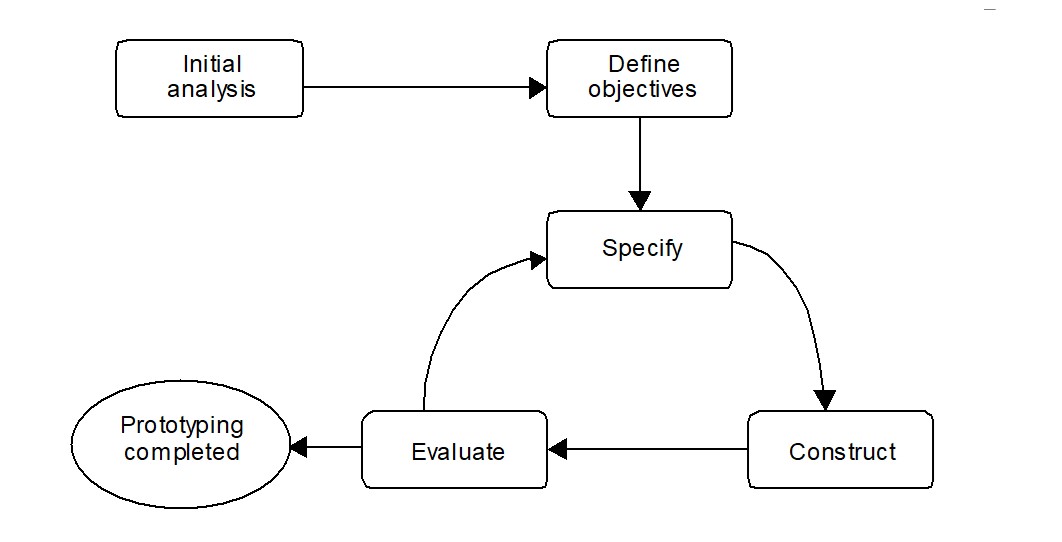
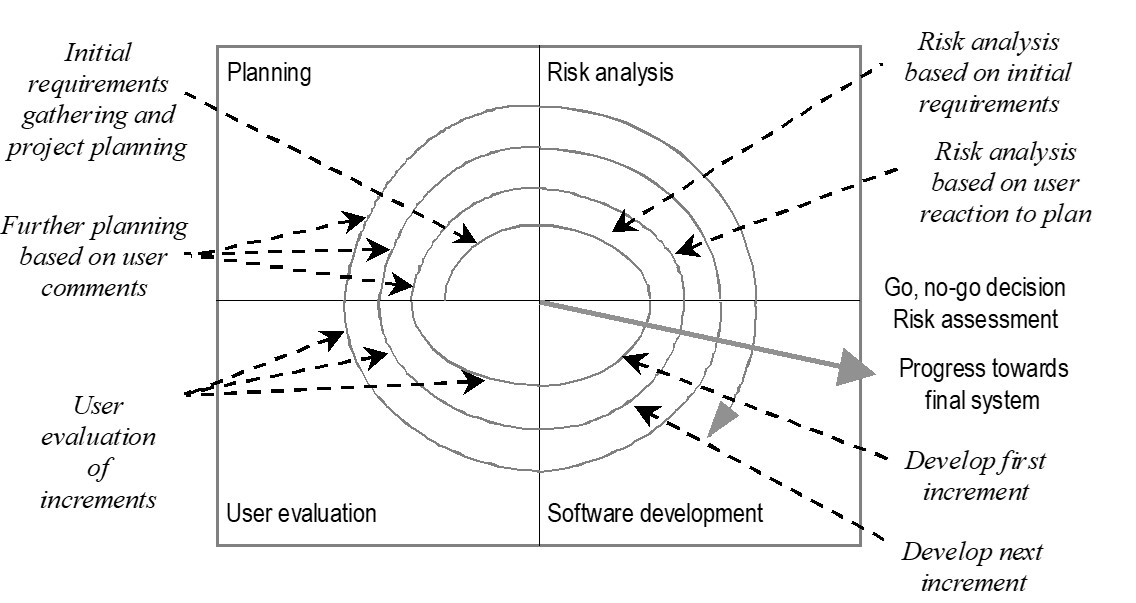
Prototyping Life Cycle
Prototyping - Advantages
- Early demonstrations of system functionality help identify any misunderstandings between developer and client
- Client requirements that have been missed are identified
- Difficulties in the interface can be identified
- The feasibility and usefulness of the system can be tested, even though, by its very nature, the prototype is incomplete
Prototyping - Problems
- The client may perceive the prototype as part of the final system
- The prototype may divert attention from functional to solely interface issues
- Prototyping requires significant user involvement
- Managing the prototyping life cycle requires careful decision making
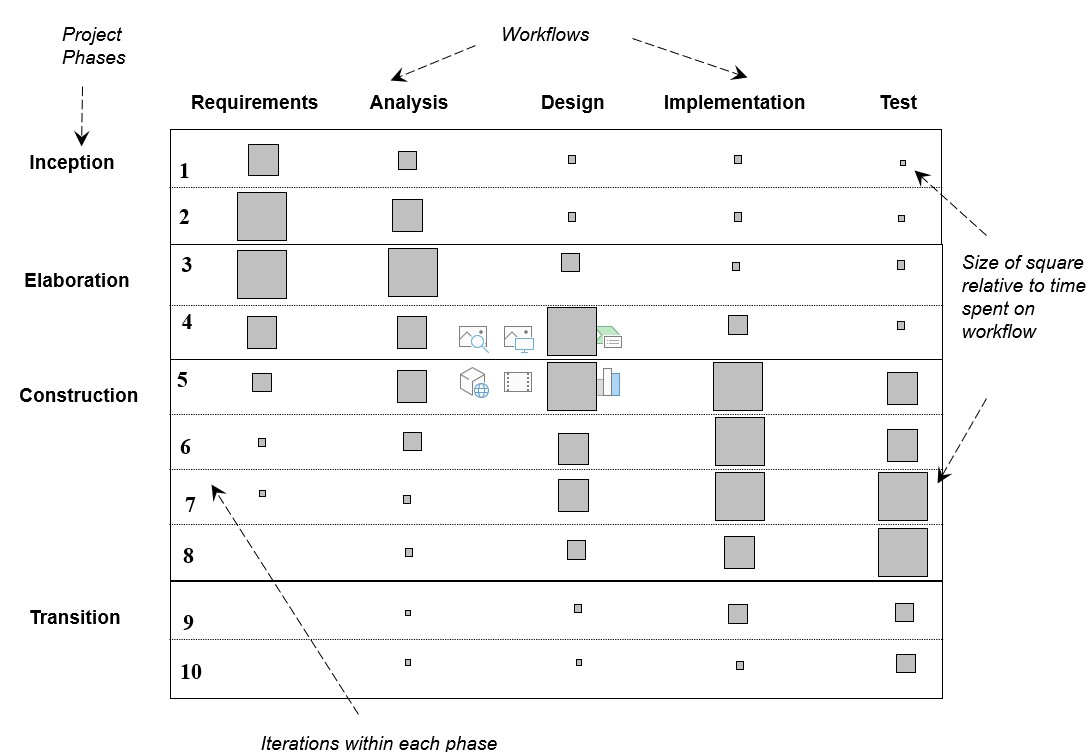
Unified Software Development Process
- Captures many elements of best practice
- Main phases
- Inception is concerned with determining the scope and purpose of the project
- Elaboration focuses requirements capture and determining the structure of the system
- Construction’s main aim is to build the software system
- Transition deals with product installation and rollout
User Involvement
A key factor in maximizing the chance of success is ensuring continued and effective user involvement throughout the project.
A prototyping approach dependent upon continuing user involvement and naturally encourages user involvement.
Users can be involved in projects at various levels and can play many different roles.
- Direct involvement
- As Participants
Users can be involved in various ways
- As part of the development team
- Via a consultative approach
- In fact gathering
Computer Aided Software Engineering
CASE tools typically provide a range of features including
- checks for syntactic correctness
- repository support
- checks for consistency and completeness
- navigation to linked diagrams
- layering
- requirements tracing
- report generation
- system simulation
- performance analysis
- code generation
Managing Information System Development
An information system development project has many risks.
It is important at each stage to identify risks to the organization and determine their significance so that judgment can be made on the continuing viability of the project.
Summary
- Project failure issues
- The main players
- The stages in the waterfall life cycle
- Managing Information System Development
- User Involvement