Chapter 2: Process
- Process Concept
- Process Scheduling
- Operations on Processes
- Interprocess Communication
- Examples of IPC Systems
- Communication in Client-Server Systems
Objectives
- To introduce the notion of a process – a program in execution, which forms the basis of all computation
- To describe the various features of processes, including scheduling, creation and termination, and communication
- To explore interprocess communication using shared memory and message passing
- To describe communication in client-server systems
Process Concept
- An operating system executes a variety of programs:
- Batch system – jobs
- Time-shared systems – user programs or tasks
- Textbook uses the terms job and process almost interchangeably
- Process – a program in execution; process execution must progress in sequential fashion
- Multiple parts
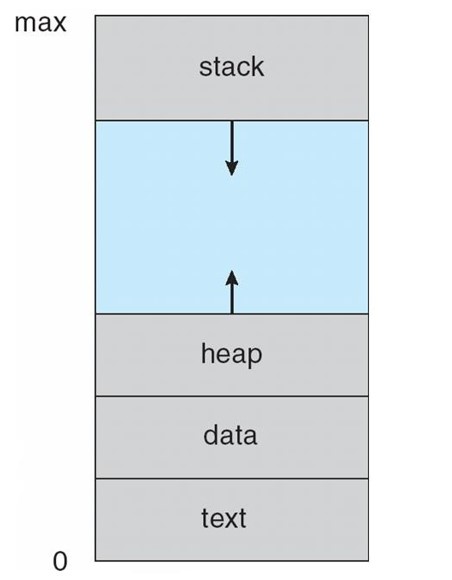
- The program code, also called text section
- Current activity including program counter, processor registers
- Stack containing temporary data
- Function parameters, return addresses, local variables
- Data section containing global variables
- Heap containing memory dynamically allocated during run time
- Program is passive entity stored on disk (executable file), process is active
- Program becomes process when executable file loaded into memory
- Execution of program started via GUI mouse clicks, command line entry of its name, etc
- One program can be several processes
- Consider multiple users executing the same program
Process in Memory
Process State
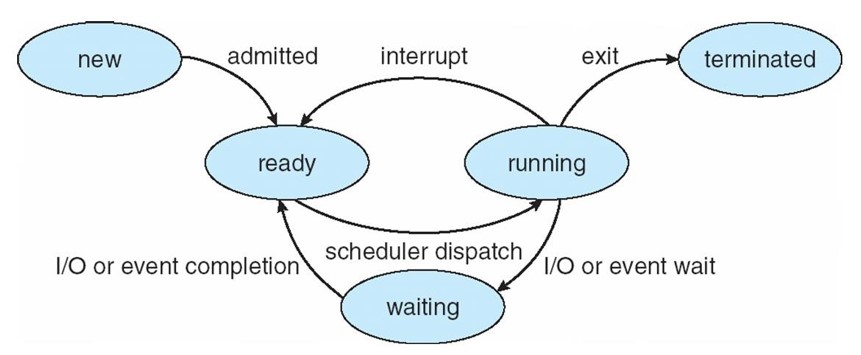
- As a process executes, it changes state
- new: The process is being created
- running: Instructions are being executed
- waiting: The process is waiting for some event to occur
- ready: The process is waiting to be assigned to a processor
- terminated: The process has finished execution
https://byjus.com/gate/process-state-in-operating-system-notes/
Diagram of Process State
Process Control Block (PCB)
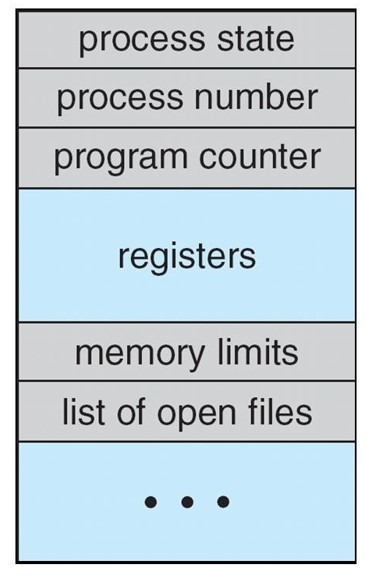
Information associated with each process (also called task control block)
- Process state – running, waiting, etc
- Program counter – location of instruction to next execute
- CPU registers – contents of all process-centric registers
- CPU scheduling information – priorities, scheduling queue pointers
- Memory-management information – memory allocated to the process
- Accounting information – CPU used, clock time elapsed since start, time limits
- I/O status information – I/O devices allocated to process, list of open files
Threads
- So far, process has a single thread of execution
- Consider having multiple program counters per process
- Multiple locations can execute at once
- Multiple threads of control -> threads
- Multiple locations can execute at once
- Must then have storage for thread details, multiple program counters in PCB
- See next chapter
https://byjus.com/gate/what-is-thread-in-operating-system-notes/
Process Scheduling
- Maximize CPU use, quickly switch processes onto CPU for time sharing
- Process scheduler selects among available processes for next execution on CPU
- Maintains scheduling queues of processes
- Job queue – set of all processes in the system
- Ready queue – set of all processes residing in main memory, ready and waiting to execute
- Device queues – set of processes waiting for an I/O device
- Processes migrate among the various queues
https://byjus.com/gate/process-scheduling-in-operating-system-notes/
Schedulers
- Short-term scheduler (or CPU scheduler) – selects which process should be executed next and allocates CPU
- Sometimes the only scheduler in a system
- Short-term scheduler is invoked frequently (milliseconds) -> (must be fast)
- Long-term scheduler (or job scheduler) – selects which processes should be brought into the ready queue
- Long-term scheduler is invoked infrequently (seconds, minutes) -> (may be slow)
- The long-term scheduler controls the degree of multiprogramming
- Processes can be described as either:
- I/O-bound process – spends more time doing I/O than computations,
- many short CPU bursts
- CPU-bound process – spends more time doing computations; few very long CPU bursts
- Long-term scheduler strives for good process mix
https://byjus.com/gate/process-scheduler-in-operating-system-notes/
Addition of Medium Term Scheduling
- Medium-term scheduler can be added if degree of multiple programming needs to decrease
- Remove process from memory, store on disk, bring back in from disk to continue execution: swapping
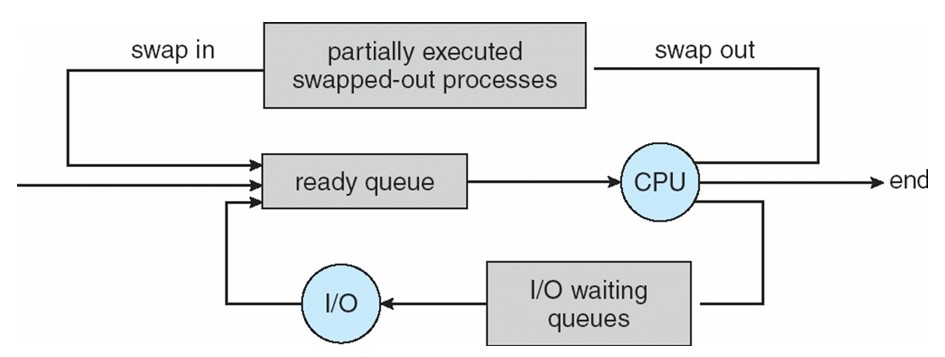
- Remove process from memory, store on disk, bring back in from disk to continue execution: swapping
Multitasking in Mobile Systems
- Some mobile systems (e.g., early version of iOS) allow only one process to run, others suspended
- Due to screen real estate, user interface limits iOS provides for a
- Single foreground process – controlled via user interface
- Multiple background processes – in memory, running, but not on the display, and with limits
- Limits include single, short task, receiving notification of events, specific long-running tasks like audio playback
- Android runs foreground and background, with fewer limits
- Background process uses a service to perform tasks
- Service can keep running even if background process is suspended
- Service has no user interface, small memory use
Context Switch
- When CPU switches to another process, the system must save the state of the old process and load the saved state for - the new process via a context switch
- Context of a process represented in the PCB
- Context-switch time is overhead; the system does no useful work while switching
- The more complex the OS and the PCB -> the longer the context switch
- Time dependent on hardware support
- Some hardware provides multiple sets of registers per CPU
- multiple contexts loaded at once
- Some hardware provides multiple sets of registers per CPU
Process Creation
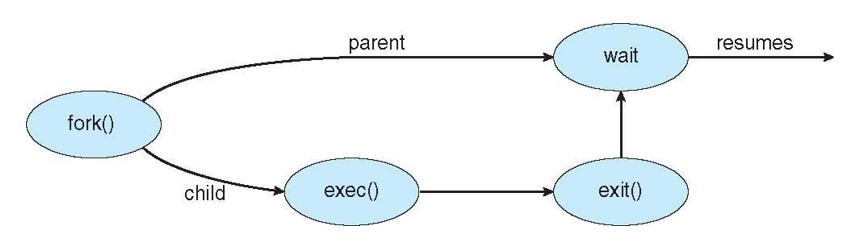
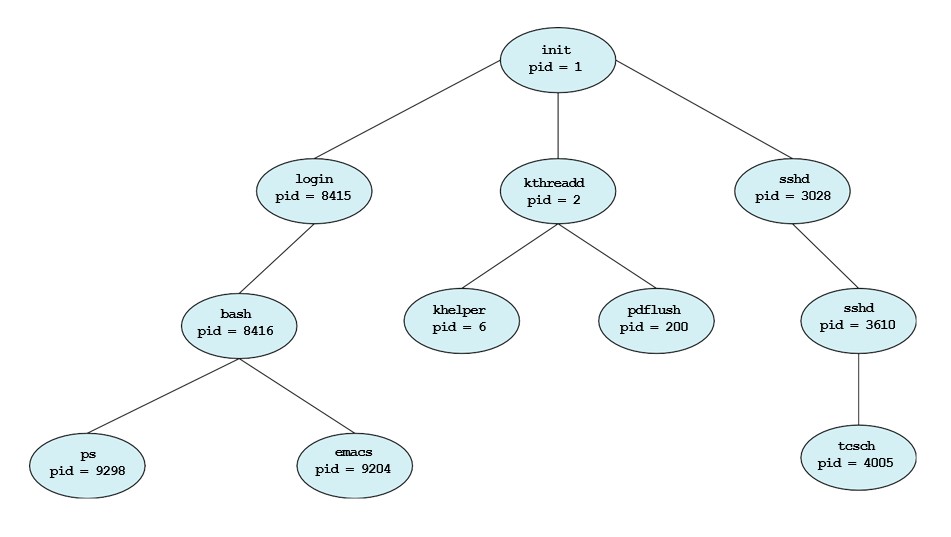
- Parent process create children processes, which, in turn create other processes, forming a tree of processes
- Generally, process identified and managed via a process identifier (pid)
- Resource sharing options
- Parent and children share all resources
- Children share subset of parent’s resources
- Parent and child share no resources
- Execution options
- Parent and children execute concurrently
- Parent waits until children terminate
- Address space
- Child duplicate of parent
- Child has a program loaded into it
- UNIX examples
- fork() system call creates new process
- exec() system call used after a fork() to replace the process’ memory space with a new program
https://www.tutorialspoint.com/what-is-process-creation-in-operating-systems
https://byjus.com/gate/difference-between-fork-and-exec/
A Tree of Processes in Linux
Process Termination
- Process executes last statement and then asks the operating system to delete it using the exit() system call.
- Returns status data from child to parent (via wait())
- Process’ resources are deallocated by operating system
- Parent may terminate the execution of children processes using the abort() system call. Some reasons for doing so:
- Child has exceeded allocated resources
- Task assigned to child is no longer required
- The parent is exiting and the operating systems does not allow a child to continue if its parent terminates
- Some operating systems do not allow child to exists if its parent has terminated. If a process terminates, then all its children must also be terminated.
- cascading termination. All children, grandchildren, etc. are terminated.
- The termination is initiated by the operating system.
- The parent process may wait for termination of a child process by using the wait()system call. The call returns - status information and the pid of the terminated process
pid = wait(&status);
- If no parent waiting (did not invoke wait()) process is a zombie
- If parent terminated without invoking wait, process is an orphan
https://www.tutorialspoint.com/what-is-process-termination
https://www.geeksforgeeks.org/difference-between-zombie-orphan-and-daemon-processes/
Multiprocess Architecture – Chrome Browser
- Many web browsers ran as single process (some still do)
- If one web site causes trouble, entire browser can hang or crash
- Google Chrome Browser is multiprocess with 3 different types of processes:
- Browser process manages user interface, disk and network I/O
- Renderer process renders web pages, deals with HTML, Javascript. A new renderer created for each website opened
- Runs in sandbox restricting disk and network I/O, minimizing effect of security exploits
- Plug-in process for each type of plug-in

https://byjus.com/gate/multiprocessing-operating-system-notes/
Interprocess Communication
Interprocess communication (IPC) is a set of programming interfaces that allow a programmer to coordinate activities among different program processes that can run concurrently in an operating system. This allows a program to handle many user requests at the same time.
- Processes within a system may be independent or cooperating
- Cooperating process can affect or be affected by other processes, including sharing data
- Reasons for cooperating processes:
- Information sharing
- Computation speedup
- Modularity
- Convenience
- Cooperating processes need interprocess communication (IPC)
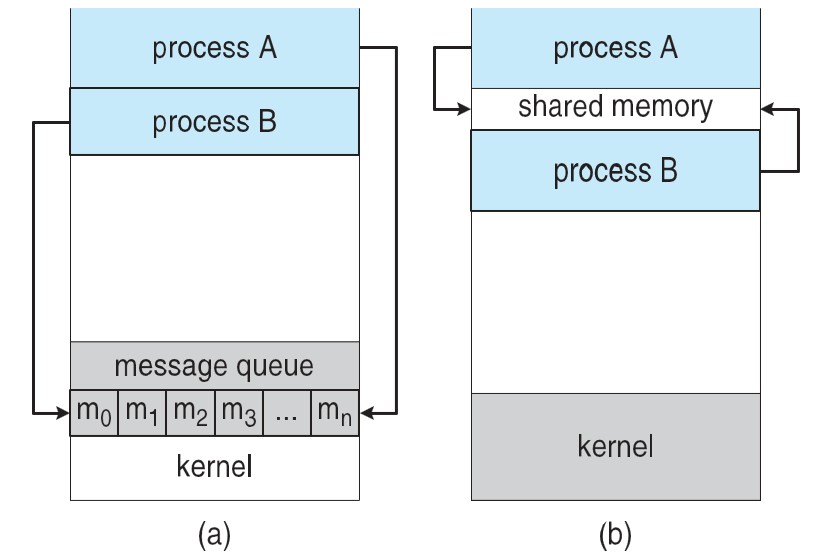
- Two models of IPC
- Shared memory
- Message passing
https://www.tutorialspoint.com/what-is-inter-process-communication
https://www.geeksforgeeks.org/inter-process-communication-ipc/
https://byjusexamprep.com/gate-cse/inter-process-communication
Communications Models
(a) Message passing. (b) shared memory.
Cooperating Processes
- Independent process cannot affect or be affected by the execution of another process
- Cooperating process can affect or be affected by the execution of another process
- Advantages of process cooperation
- Information sharing
- Computation speed-up
- Modularity
- Convenience
Interprocess Communication – Shared Memory
- An area of memory shared among the processes that wish to communicate
- The communication is under the control of the users processes not the operating system.
- Major issues is to provide mechanism that will allow the user processes to synchronize their actions when they access shared memory.
Interprocess Communication – Message Passing
- Mechanism for processes to communicate and to synchronize their actions
- Message system – processes communicate with each other without resorting to shared variables
- IPC facility provides two operations:
- send(message)
- receive(message)
- The message size is either fixed or variable
- Implementation of communication link
- Physical:
- Shared memory
- Hardware bus
- Network
- Logical:
- Direct or indirect
- Synchronous or asynchronous
- Automatic or explicit buffering
- Physical: